

In WordPress, adding a 301 redirect takes about ten seconds. A marketer installs a redirect plugin, types the old URL and the new URL, and clicks save. Done.
Then the company moves to a headless setup with Next.js, and suddenly the SEO manager has to open a ticket, wait for a developer, and wait again for a full deployment just to redirect one page or create a /webinar link for a campaign. If that sounds familiar, your headless setup is missing a basic operational piece: headless CMS redirect management.
Why redirects get harder in headless
In a traditional WordPress site, the CMS and the website are the same application. Every request passes through WordPress, so a plugin can check the database for a redirect rule before it loads the page.
In a headless site, the public website is a separate Next.js application, often served from a CDN. Most pages are prepared in advance and never touch the CMS at request time. That is great for speed, but it means nobody is checking a redirect table unless you build that on purpose.
And redirects matter more than most teams realise:
- Site migrations. When URLs change, every old URL with traffic or backlinks needs a proper permanent redirect, or you lose rankings and send visitors to error pages.
- Content cleanups. Merged articles, renamed services and retired products all need redirects.
- Vanity URLs and campaign shortlinks. Links like
/webinar,/offeror/qr-brochureare short, memorable addresses that point to longer landing pages, often with campaign tracking attached. - Fixing mistakes fast. A broken link in a printed brochure or a live ad should be fixable in minutes, not next sprint.
The three common approaches (and where each one struggles)
1. Hardcoding redirects in next.config.js
This is the first thing most developers reach for, and for a small site it is perfectly fine. You list redirects in the Next.js config file and deploy.
The problems appear as the list grows:
- Every change needs a developer and a redeploy. Marketers are blocked.
- There are platform limits. The official Next.js documentation notes that redirects may have limits on some platforms and gives the example that on Vercel the limit is 1,024 redirects. It recommends a custom approach, such as Middleware, once you have 1,000 or more.
- A big config file is hard to review and easy to break. One typo can fail a build.
A small detail worth knowing: in next.config.js, a redirect marked permanent: true sends a 308 status, and a non-permanent one sends 307. Search engines treat 308 as a permanent redirect, so this is usually fine for SEO, but if your SEO team specifically needs 301 and 302 codes, a custom edge solution gives you that control.
2. Asking the CMS on every request
The second approach is to have the Next.js app query the CMS or a database for a redirect on each page request.
This gives marketers control, but it adds a network round trip to your CMS before every page. On a site where most pages are meant to be served instantly from a CDN, that trade-off defeats much of the reason you went headless. It also puts your CMS under load from every visitor and every bot.
3. Redirects at the edge, managed from the CMS
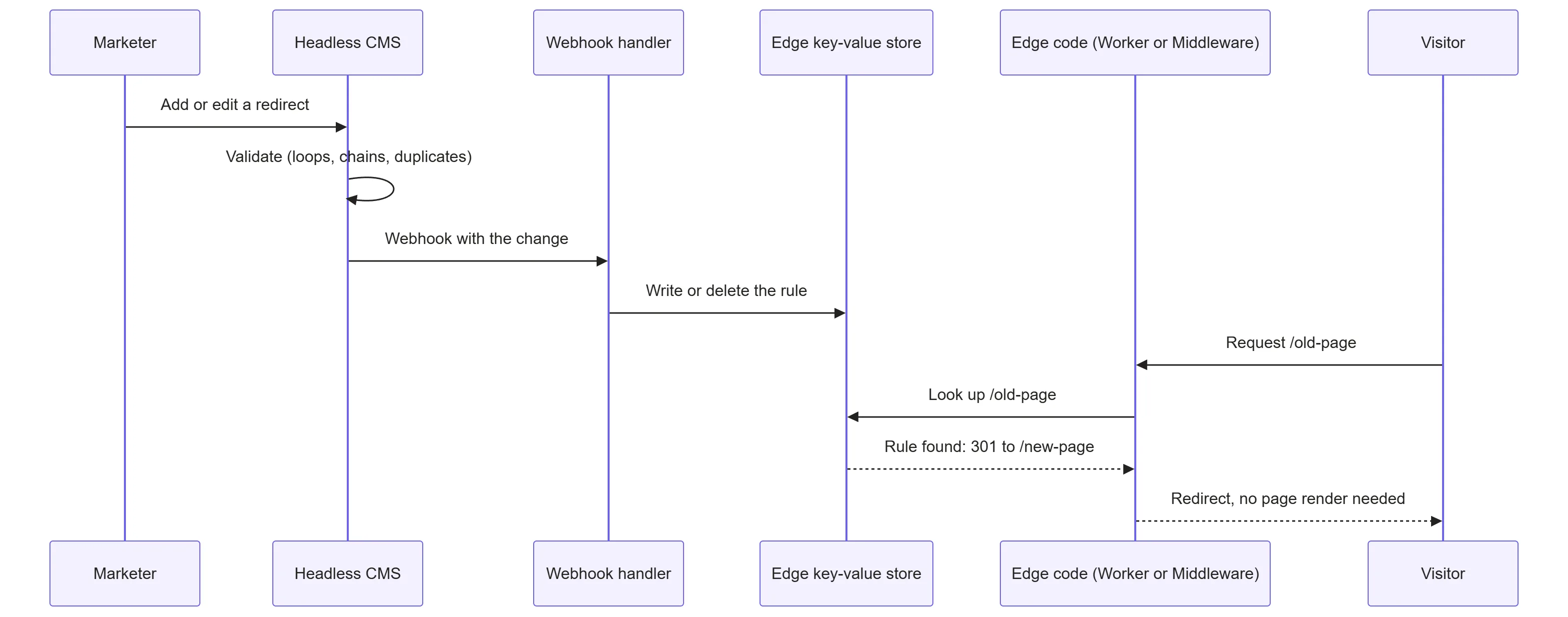
The third approach is the one that scales. The CMS holds an editable Redirects table. When someone saves a redirect, an automatic message called a webhook sends the update to a fast key-value store at the edge. A small piece of code at the edge checks each incoming URL against that store and redirects immediately if there is a match, before any page is rendered.
The marketer works in a normal dashboard. The visitor never waits for the CMS. No developer or deployment is involved for routine changes.
Comparing your options
| Approach | Who can change redirects | Scales to thousands of rules | Adds latency to normal pages | Main trade-off |
|---|---|---|---|---|
next.config.js | Developers only, via redeploy | Limited by platform (for example 1,024 on Vercel) | None | Simple but rigid |
| Query the CMS per request | Marketers | Yes | Yes, a round trip each time | Slows the site, loads the CMS |
| Edge key-value store synced from the CMS | Marketers | Yes | Very little for most requests | More to build and monitor |
| CDN-level bulk redirect tools (for example Cloudflare Bulk Redirects) | Whoever manages the CDN | Depends on plan and tool | None to the app | Managed outside the CMS, usually simple exact-match rules |
There is no single winner. A small marketing site with 50 redirects can stay in next.config.js and be perfectly happy. The edge approach becomes worthwhile when redirects are numerous, change often, or are owned by non-developers.
Enterprise SEO tooling every headless CMS development company should build into your dashboard
A redirect table is the start, not the finish. If you are evaluating a headless CMS development company, or planning to build this in-house, look for the following features. They separate a real redirect manager from a spreadsheet with a webhook.
Fields marketers actually need
- Source path and destination (a path or a full URL).
- Status code: 301 or 308 for permanent, 302 or 307 for temporary.
- Match type: exact match for most rules, with optional pattern rules for whole sections (for example
/blog/2019/*). - Query string handling: keep, drop or append parameters. This matters for campaign links where tracking tags must survive.
- Active, start date and end date, so a campaign shortlink can expire on its own.
- Notes and owner, so people know why a rule exists in two years.
Validation that prevents SEO damage
- Redirect chain detection. If
/aredirects to/b, and someone adds/bto/c, you now have a chain. Every extra hop slows the visitor and dilutes crawling. A good system warns about the chain or updates the first rule so/agoes straight to/c. - Loop detection.
/ato/bto/abreaks the page entirely. Block it at save time. - Duplicate and conflict checks. Two rules for the same source should never be allowed.
- Normalisation. Decide how to treat trailing slashes, uppercase and lowercase, and query strings, and apply the same rule consistently on save and on lookup.
- Destination checks. Warn if a rule points to a page that is unpublished, deleted or itself returns an error.
Bulk tools for migrations
A migration can involve thousands of URLs. The dashboard should support CSV import and export, preview before publishing, and a way to roll back a bad import.
Visibility and safety
- An audit log showing who changed what and when.
- Roles and approvals, so an intern cannot accidentally redirect the homepage.
- Testing: a small “test this URL” box that shows where a path would go.
- Reporting: which redirects are used, and which old URLs still receive traffic or 404 errors. This usually comes from your analytics or CDN logs, not from writing a counter on every request.
How the edge lookup works in practice
There are two common ways to run the lookup, depending on where your site is hosted.
Option A: Next.js Middleware with a fast data store
Next.js lets you run code before a page is rendered. The official documentation suggests reading from a store built for fast reads, such as Vercel Edge Config or Redis, for large numbers of redirects. It also describes a Bloom filter approach: a compact file that tells you quickly whether a path is probably in the redirect list, so most requests skip the store lookup entirely.
A simplified example of the idea:
// middleware.ts (the file convention is renamed in some newer Next.js versions, check your version)
import { NextRequest, NextResponse } from 'next/server';
import { get } from '@vercel/edge-config';

type Rule = { to: string; status: 301 | 302 | 307 | 308 };

export async function middleware(req: NextRequest) {
  const path = req.nextUrl.pathname.toLowerCase().replace(/\/+$/, '') || '/';
  const key = encodeKey(path); // keys have character limits, so encode the path
  const rule = await get<Rule>(key);

  if (rule) {
    const target = new URL(rule.to, req.url);
    // keep campaign parameters if the rule allows it
    req.nextUrl.searchParams.forEach((v, k) => target.searchParams.set(k, v));
    return NextResponse.redirect(target, rule.status);
  }
  return NextResponse.next();
}

export const config = {
  matcher: ['/((?!_next/static|_next/image|favicon.ico|api).*)'],
};
Two cautions. Check the size and key limits of your plan, because a single large JSON object of every redirect may not fit. And do not run the check on static assets, which the matcher above avoids.
Option B: A Cloudflare Worker in front of the site
If your site sits behind Cloudflare, a Worker can check a Workers KV namespace before the request ever reaches your origin or hosting platform.
export default {
  async fetch(request, env) {
    const url = new URL(request.url);
    const key = url.pathname.toLowerCase().replace(/\/+$/, '') || '/';
    const rule = await env.REDIRECTS.get(key, { type: 'json' });

    if (rule) {
      const target = new URL(rule.to, url.origin);
      return Response.redirect(target.toString(), rule.status);
    }
    return fetch(request);
  },
};
Cloudflare describes KV as an eventually consistent store built for read-heavy workloads. Two practical consequences follow:
- Updates are not instant everywhere. A change can take up to about a minute to appear in all locations, so tell your team to expect a short delay.
- Frequently read keys are fast, rarely read keys can be slower on the first request. Hot redirects such as campaign links tend to perform very well, while an obscure old URL may take longer the first time.
Because real-world speed depends on location, traffic pattern and configuration, measure your own setup instead of trusting a number from a blog post, including this one.
The webhook that keeps everything in sync
When the CMS saves a redirect, it calls a small endpoint you control. That endpoint checks a secret, then writes or deletes the matching key in the store. A few rules keep it reliable:
- Verify the secret so strangers cannot change your redirects.
- Make writes repeatable. Sending the same update twice should be harmless.
- Handle failures. If the store is unreachable, retry and alert someone. A silent failure means a marketer thinks a redirect is live when it is not.
- Offer a full resync button that rebuilds the store from the CMS table, for disaster recovery and for large imports.
Order of operations: what runs first?
When several systems can redirect, the order matters. A simple, safe order looks like this:

Keep exact matches before pattern rules, never redirect assets, and log 404s so your team can find missing redirects after a migration.
Special cases worth planning for
- Campaign shortlinks and tracking. A link like
/webinarcan redirect to a long landing page with UTM tags attached. Decide whether the redirect should use a temporary code, since the short link is a campaign tool and not a permanent move, and whether incoming parameters should be preserved. - Retired content. Not everything deserves a redirect. If a page is truly gone and has no good replacement, a proper 404 or 410 can be better than sending visitors to an unrelated page.
- Multilingual and multi-domain sites. Rules may need a language or domain field so that
/en/pricingand/de/pricingare handled separately. - HTTPS and domain-level redirects. Redirecting
httptohttpsor non-www to www should usually be handled once at the CDN or hosting level, not as thousands of table rows. - Pre-launch testing. Before a migration goes live, crawl the old site, run every old URL against the new redirect table, and list anything that ends in an error or a chain. Fix those before launch day.
A quick checklist for your own setup
- Can a marketer add, edit and expire a redirect without a developer?
- Does the site avoid a CMS lookup on every normal page request?
- Are chains, loops and duplicates blocked at save time?
- Can you import and export redirects in bulk, with a preview?
- Is there an audit log and a way to test a URL?
- Does the team know how long changes take to appear, and is there a resync option?
- Are 404s monitored so missed redirects are noticed quickly?
If you answered no to several of these, your SEO team is probably working around the system instead of with it.
Frequently asked questions
Can marketers add 301 redirects in a headless CMS without redeploying Next.js?
Yes, if the setup includes a redirects collection in the CMS that syncs to an edge store, and Middleware or an edge Worker reads from it. Without that, redirects in next.config.js need a redeploy.
How many redirects can I put in next.config.js?
It depends on your platform. The Next.js documentation gives the example that on Vercel the limit is 1,024 redirects, and suggests Middleware or a custom solution beyond roughly a thousand.
Does a redirect at the edge hurt page speed?
A lookup adds a small step, but it is usually tiny compared with rendering a page, especially when the store is read-optimised and frequently used keys are cached. Measure it on your own setup.
Is a 308 redirect as good as a 301 for SEO?
Search engines treat 308 as a permanent redirect, like 301. The difference is mainly technical, so it matters mostly if your reporting or rules specifically expect 301.
Should every old URL be redirected after a migration?
Not necessarily. Redirect URLs that have traffic, backlinks or a clear replacement. Pages with no equivalent may be better served with a clean 404 or 410.
Final thoughts
Headless architecture gives you speed and flexibility, but it also removes some conveniences that WordPress quietly provided. Redirect management is one of the most important. The fix is not complicated in principle: a redirect table in the CMS, a webhook, a fast edge store and a small piece of lookup code. The craft is in the details, such as validation, bulk tools, safe syncing and monitoring.